
Fujifilm X Series: Understanding Still Menu Image Quality Setting (Post 2/3)
Mastering JPEG quality, film simulations, and Fujifilm’s signature color science

📖 The Image Quality Setting menu is one of the most comprehensive in the Fujifilm X Series — so rich, in fact, that it will be covered across three separate posts.
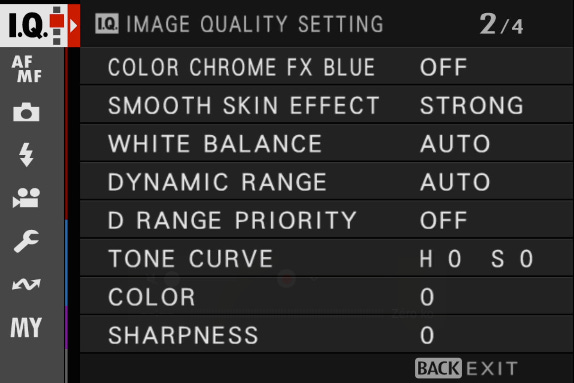
👉 This is Part 2 of 3, and it covers the following settings:
Color Chrome FX Blue
Smooth Skin Effect
White Balance
Dynamic Range
D Range Priority
Tone Curve
Color
Sharpness
👉 Part 1 is already available here: https://jmplisson.substack.com/p/fujifilm-x-series-understanding-still-menu-image-quality-setting-1-to-3
Menu overview
Color Chrome FX Blue
📸 What it does
Color Chrome FX Blue enhances the depth, detail, and tonal richness of blue tones in your images. It works similarly to the standard Color Chrome Effect but applies specifically to highly saturated blue areas — such as skies, water, or clothing.
The effect subtly darkens and intensifies bright blues, reducing flatness and helping to recover detail without boosting saturation unnaturally. It’s ideal when you want blues to look richer, deeper, and more dimensional in-camera.
📝 Note: This setting affects JPEG and HEIF files only. RAW files are not altered, although the preview reflects the effect.
⚙️ Available options
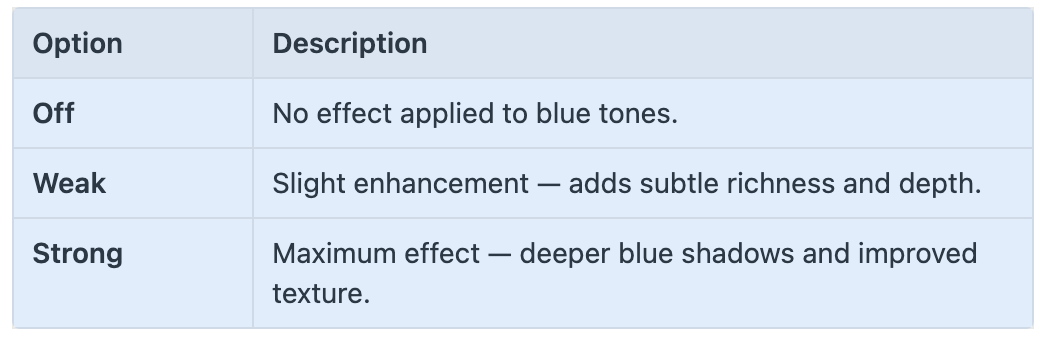
Color Chrome FX Blue works best when your image includes highly saturated blue elements — otherwise, the effect is minimal.
🎯 When and why to use it
To deepen the look of skies in landscapes without needing filters.
To enhance detail and texture in blue clothing, shadows, or water.
To avoid overly flat, bright blues in JPEGs — especially under strong sunlight.
Great when paired with simulations like Velvia, Classic Chrome, or Provia.
🛠 Recommended setting
Weak is a good default — natural and subtle for most scenes.
Use Strong when you want noticeable depth in blue-dominant images (skies, oceans, etc.).
Turn it Off for portraits or scenes without prominent blues.
💡 Tips
Combine it with Color Chrome Effect (standard) to enrich both overall saturated colors and blue tones specifically.
The effect is most noticeable in bright daylight, where blue skies or reflections dominate.
Since it’s a JPEG/HEIF-only effect, shoot RAW + JPEG if you want the look and still keep editing flexibility.
If you use Velvia, which already boosts blues, set Color Chrome FX Blue to Weak to avoid overdoing it.
Smooth Skin Effect
📸 What it does
Keep reading with a 7-day free trial
Subscribe to The Unofficial Fuji X Series User's Guide (EN) to keep reading this post and get 7 days of free access to the full post archives.